Content
General ledger (G/L) account numbers categorize transactions into revenue, expenses, transfers, assets, and liabilities. The University’s Chart of Accounts provides a full listing of G/L numbers. By assigning the correct G/L to each transaction, the University can accurately categorize financial activity and analyze how funding is spent. Consistent, accurate use of the Chart of Accounts is essential to UNL’s financial reporting.
Many Names, Same Information
GL, General Ledger, Cost Element, Commitment Item, Revenue Element, Account -- at the University, all of these terms are names for the same thing – a general ledger account or GL. In SAP, GLs are known as “cost elements.” The BCS budgeting system and Business Intelligence reports call them “commitment items.”
GL Number Structure
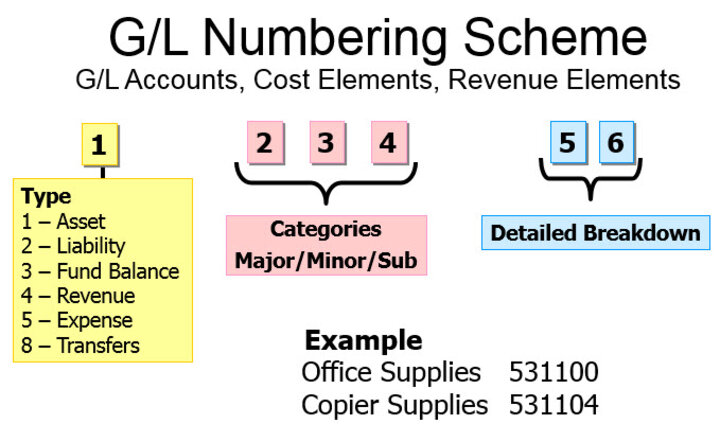
GLs are 6 digits long and each digit provides information.
- The first digit identifies the type of transaction: Revenue postings start with 4; Expense postings start with 5. A GL starting with an 8 is a transfer of funds from one area of UNL to another -- usually from one funding source to another – and occurs infrequently.
- The second, third and fourth digits represent the major, minor and subcategories of what the transaction paid for (expense) or was received for (revenue);
- The fifth/sixth allow for a more detailed breakdown of what the transaction was for.
Departments only use GL accounts for Revenue (4xxxxx), Expense (5xxxxx), or Transfers (8xxxxx). Assets and liabilities are not used at the department level.
Expense Example
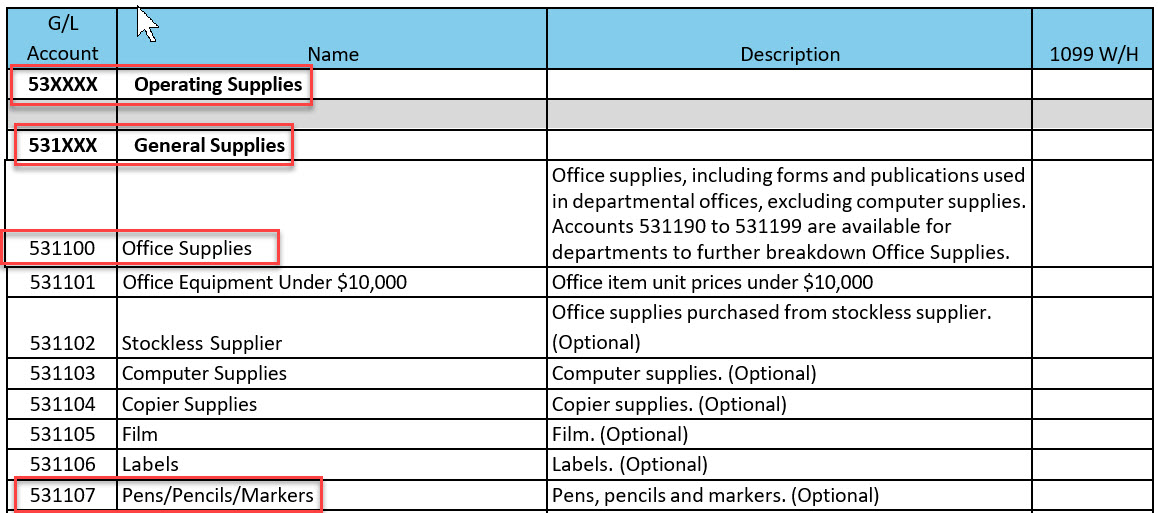
The best way to learn how to assign a GL is to become familiar with the Chart of Accounts tables. For example, if a department purchased pens, the person coding the expense would review the Expense Chart of Accounts to determine which GL to assign to the purchase. The purchased item may be categorized in a general G/L or using a more specific G/L, if a detailed-level of data is needed. Each additional G/L digit adds specificity. For example, the digits in GL 531100 indicate the following: 5 indicates an expense transaction, 53xxxx is operating supplies, 531xxx is general supplies and 531100 is office supplies. An office supply purchase may be posted to the GL of 531100, or to a more specific category in that range. For example, if a department needed to track how much was spent on pens, they would use G/L 531107 for those expenditures.
Proper Use of GLs
Revenue: GLs start with 4
All G/L accounts that start with a 4 are for recording revenue.
In some cases, it may not be immediately obvious that financial activity should be recorded using a Revenue GL. Several such situations are outlined below.
Refunds of Revenue
Disbursements for refunds of revenue should be coded to an appropriate G/L account that starts with a 4, indicating "revenue." For example, if a student paid an application fee to the university, it is recorded as revenue. Later, if the university needed to refund the student’s application fee to the student, then the University would refund the funds using the same revenue G/L to which the revenue was originally posted. Backing the transaction out of the same G/L to which it was previously posted prevents an overstatement of revenue on financial statements.
Rebates from Vendors
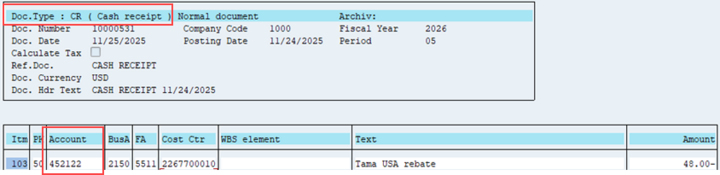
Rebates from vendors should be coded to the specific G/L 452122 Sale Material and Service Rebates. The rebate represents money that the University is receiving from a vendor, so is recorded as revenue. (Caution: Do not confuse a rebate with a refund. Read about refunds under the Expense GLs tab.)
Expense: GLs start with 5
All G/L accounts that start with a 5 are for recording expenditures. All disbursements for the procurement of goods or services must be recorded using an account from this group.
In some cases, it may not be immediately obvious that financial activity should be recorded using an Expense GL. Several such situations are outlined below.
Refund Check or Credit Memo Related to a Prior Expense
When the University purchases goods (which are posted to an expense GL) from an outside source and later receives a refund for returned merchandise, the refund should be posted to the same expense GL account used for the original transaction. Refunds may be received either as a refund check (document type CR – Cash Receipt) or as a vendor credit memo (document type KG – Vendor Credit Memo).
Recording the refund to the original expense GL allows the credit to effectively nullify the original expense. In effect, the original charge and the subsequent credit offset each other and have no net impact on expense balances in financial statements.
Example:
- A faculty member purchased a camera from a vendor for $1,000 and the expense was posted using a 52xxxx GL. Later, the camera was returned due to quality issues and the vendor fully refunded/reimbursed the $1,000 dollars to UNL. The $1,000 refund/reimbursement should be posted as a credit to the same 52xxxx GL as the original expense.
Expense G/Ls that indicate reportable income
Caution: Misapplication of G/Ls that have tax implications can cause errors that are difficult and time-consuming to correct.
Some 52, 55, 56 GL accounts are reportable on calendar year end 1099s. IRS 1099 forms are a group of tax forms that reports income paid by the University to non-employees, such as contractors or outside businesses. For the contractor or business, the 1099 amount must be reported as income on their tax filing.
Below are examples of GLs that appear in the 52, 55 and 56 series in the GL Account Expenditures List:
- In the 521xxx G/L series which represent General Operating Expenses, G/L 521701 Awards Paid to Individuals indicates the University has paid a monetary award to a non-employee.
- In the 552xxx G/L series which represent Building Expenses, G/L 552302 Buildings - Outside A/E Services indicates the University has paid for outside architectural engineering services in connection with building construction.
- In the 562xxx G/L series which represents Miscellaneous Government Aid, G/L 562307 Visiting Student Stipends - Other indicates the University made a stipend payment to a student for room/board, travel, research expenses and equipment.
In all of these cases, the University must issue a 1099 to the recipient. This form reports the payment amount to the IRS and identifies the payment as taxable income to the individual or business receiving the funds.
Internal Charges (ICs and IBs)
There are G/Ls that are specifically used for internal charges (ICs and IBs).
Internal charges (ICs and IBs) are used when one University department bills another department or another area in the NU system (e.g., UNOP, UNL, UNK) for goods or services. These transactions simply move funds within the University and do not increase or decrease total University revenue or expenses. Because they are internal only, they are recorded using specific G/L accounts so they can be excluded from the University’s overall financial statements. Detailed instructions for how to properly assign G/Ls to internal transactions are provided in the Internal Charges (IC and IBs) section of the Journal Entries and Internal Charges manual.
Roles
The "billing department" is the department that provided the good or service. The "expending department" is the department that received/purchased the good or service. It is the billing department’s responsibility to record the transaction that debits the expending department’s cost object and credits its own. This ensures payment for the goods or services the billing department provided and the expending department received.
"Planned" in G/L Name
GL accounts labeled "Planned" in the G/L name are for budget/plan purposes only. Revenue and expenses cannot be posted to these accounts.


Chart of Accounts Lists
The following resources are available in Sapphire. Viewing requires TrueYou authentication.
- The most used documents are: Expenditures, Revenues and Transfers -- If you open these documents electronically, you can then use the keyboard shortcut “Control F” to find something in the electronic file, rather than printing the document and manually searching pages.
- The GL Account Code Structure summarizes GL categories.
- Detailed lists of all GLs and additional documentation may be found in the Sapphire folder found at SAP Documentation>Financial.
Financial Operations
Journal Entries
Reconcile Cost Objects
Reconcile Payroll