Content
Overview
A cost object number is a unique identifier that describes a source of funds, similar to a bank account number. When UNL’s funding is distributed to departments for use, each portion of funding is identified with a cost object number. The University has thousands of cost objects, but each cost object is assigned to a department that is responsible for properly managing those funds.
UNL Funding and Cost Objects - This video (8:50) introduces UNL's main funding sources and explains how funds are identified with the cost object numbering system.
The phrase “cost object” refers to two types of numbers:
- Cost centers are 10-digit numbers used to track income and expenses for state aided, revolving and auxiliary funds.
- WBS numbers are 13-digit numbers used to track income and expenses for grants and contracts, and funds from the University Foundation.
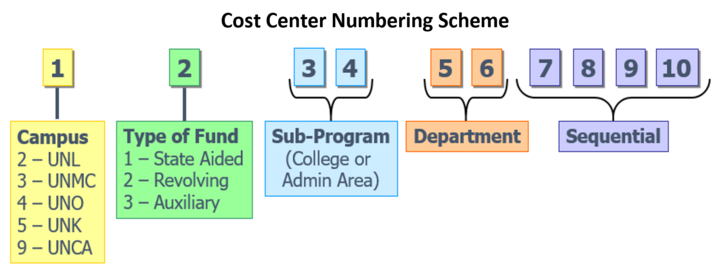
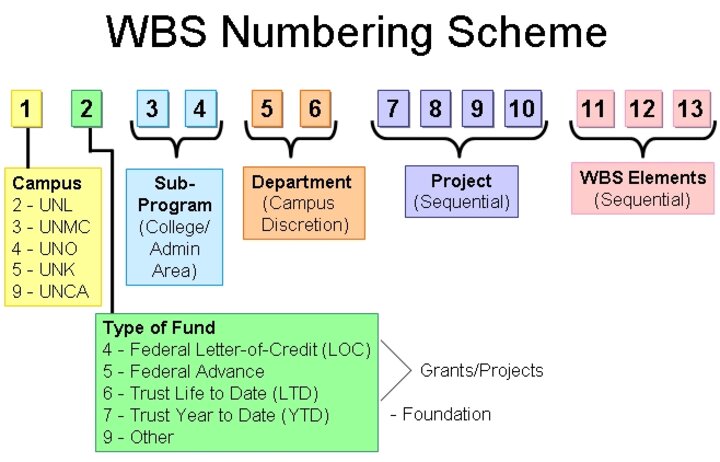
Cost objects are used to segregate financial activity based on type of operation. They are smart numbered so you can see what type of cost object it is and who owns it by looking at the different digits of the cost object number. The numbering schemes identify the campus, fund type, and sub-program and department responsible for the funding. Below is an illustration of the numbering structure for a cost center and a WBS.
Resources
UNL Funding and Cost Objects - This video (8:50) introduces UNL's main funding sources and explains how funds are identified with the cost object numbering system.
Financial Knowledge Base
UNL Funding
Fiscal Year and Fiscal Periods
Cost Objects: Cost Centers and WBS Numbers
General Ledger - GL Accounts
SAP Doc Types
Need a New/Modified Cost Center or WBS?
Follow these request instructions.
Cost Object Smart Numbering
Digits 1-2: Campus and Fund Type
When talking a funding source, University business staff use the first two digits together. For example, if a person mentioned a "21" funding source, they would be talking about a UNL state-aided fund. The first digit provides the Campus to which the funding belongs and the second digit indicates the funding source. This is true for both cost centers and WBS numbers.
State Aided Funds
UNL state-aided funds primarily consist of state funds appropriated by the Unicameral and tuition revenue. Cost centers the represent state-aided funds start with 21. There are a few types of State-Aided funds that begin with 21, but their last four digits identify their specific funding source. Details are provided in the Cost Centers: Last Four Digits section of this guide.
Revolving Funds and Auxiliary Funds
Both revolving and auxiliary funds are self-supporting, meaning the revenue is earned and used by University entities that perform some type of fee-based activity.
Revolving funds are typically earned by an academic department whose primary mission is academic, but which incidentally earns revenue. Examples of revolving funds include funds earned by providing a good or service to the campus or to external entities, registration fees charged by a department hosting a conference, funds received from student lab fees, or the incidental remainder of grant funds after completion of the grant-funded project. In each instance, the revenue is posted to the earning department's revolving cost center, which starts with a 22.
Auxiliary funds are earned by non-academic, self-supporting entities whose reason for existing is to provide their specific service to faculty, staff and students in a personal capacity. Examples of auxiliary funds are housing and parking fees charged by Housing and Parking Services, revenue from athletic ticket sales, and revenue earned by Campus Union service providers. Cost centers that provide goods or services for internal customers are designated as Service Centers. Additional information on Service Centers is available here.
| Revolving Funds Cost Centers |
|
| Auxiliary Funds Cost Centers |
|
Digits 3-6: Cost Object Ownership
Subprograms and Departments
The third through sixth digits of both Cost Centers and WBS numbers identify the subprogram and department that owns the cost object.
The sub-program is a 2-digit code that identifies the college or vice chancellor. The department is also a 2-digit code used to identify a specific department. The department code is always used in conjunction with the sub-program code. For example, department 12 can exist in multiple sub-programs so it is not useful to just look for department 12. Instead, look for department 12 within a specific sub-program. See below examples:
0512 = College of Arts & Sciences, English
4312 = Business & Finance, Budget
The complete sub-programs and department list is available in Sapphire. Viewing this list requires TrueYou authentication.
Cost Centers Only: Last 4 Digits
Parent vs. Child Cost Centers
When creating new cost centers (used for State-aided, revolving, auxiliary funds), UNL Accounting uses the last four digits of the cost center number to distinguish parent cost centers from child cost centers. Parent cost centers are assigned numbers ending in digits less than 1000 and may include several associated child cost centers. Child cost centers are assigned numbers ending in 1000 or greater, allowing for more detailed tracking of specific transactions.
This structure—commonly referred to by UNL Accounting staff as “the 1000 Rule”—helps consolidate transactions under a parent cost center for easier financial analysis while still providing detailed tracking through associated child cost centers.
Exceptions:
Some State-Aided cost centers do not follow the 1000 Rule. In these cases, the last four digits are used to identify the funding source, as described below.
State Aided Funds
Cost centers for UNL state-aided funds start with 21. For some state-aided funds, the last four digits indicate the funding source as shown in the table below.
Note: When creating a name for some state-aided fund cost centers, the name must include specific words as shown below. The name of a cost center cannot include commas, quotation marks or semi-colons.
| Type of State-Aided Fund | Smart Numbering of Last Four Digits | Name Must Include |
|---|---|---|
| Facilities & Administration | 4000-4999 | F&A |
| Programs of Excellence | 5100-5199 City Campus 5200-5299 IANR | POE |
| Distance Education | 5700-5799 | Dist Ed |
| Differential Tuition | 5800-5899 | Diff |
| Nebraska Research Initiative | 6000-6499 | NRI |
| Tobacco Funds | 6500-6999 | TOB |
Determine if Parent or Child
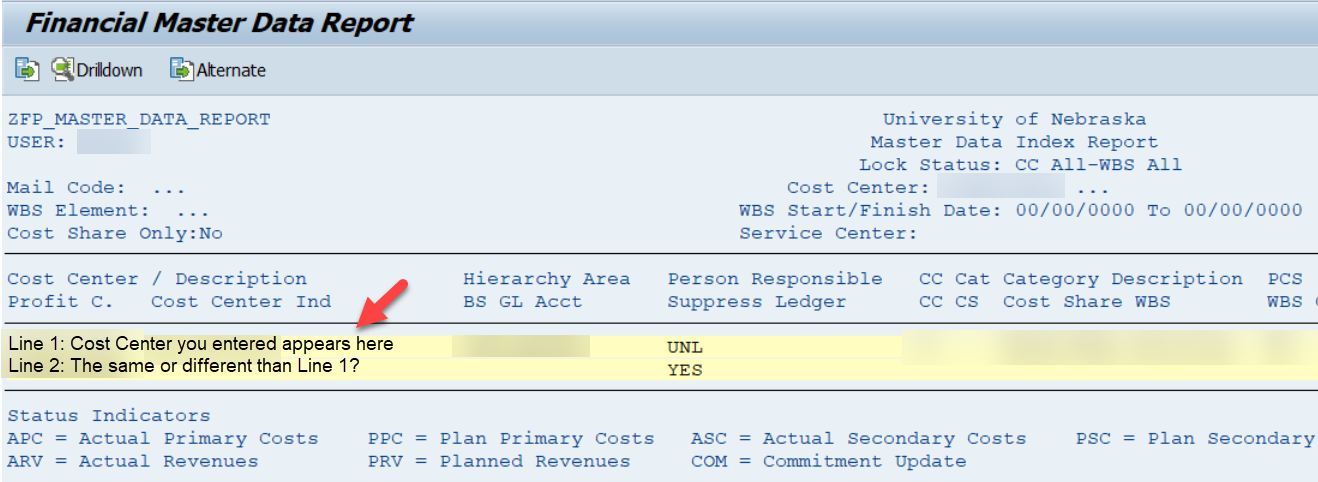
To determine if a cost center is a parent or child, use the SAP transaction code Y_UNS_83000135. Enter the cost center in question and click Execute to run the report.
- The center that you searched appears on Line 1 and its parent cost center appears on Line 2.
- If Line 1 and 2 are the same, it means that the cost center you searched is the Parent.
- If Line 1 is different than Line 2, it means that the cost center you searched is the Child (Line 1), and its parent appears on Line 2.
Find Parent/Child Relationship
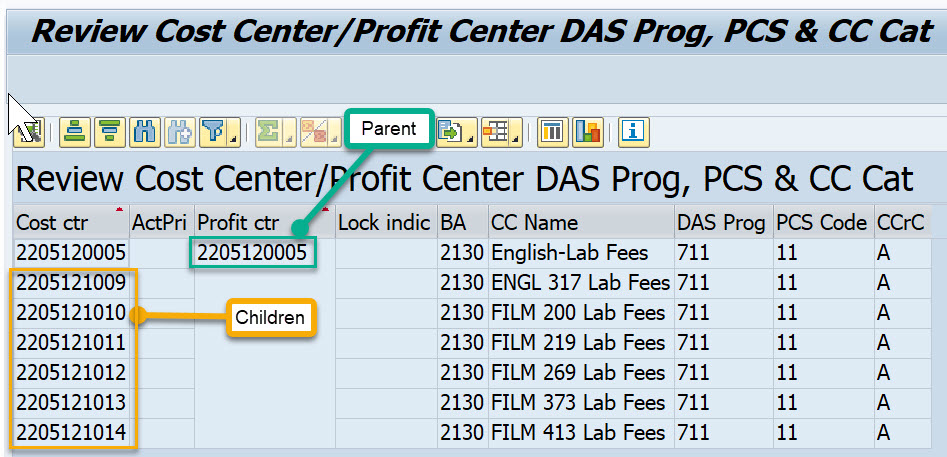
The SAP transaction code Y_UNS_83000191 provides a report that shows all the child cost centers that belong to a parent cost center. After entering the transaction code, enter the cost center of interest.
WBS Numbers: Last 3 of 13 Digits
WBS numbers are used to identify grants, contracts and Foundation funds. Like cost centers, WBS numbers are smart numbered and each digit has meaning. WBS numbers have 13 digits. Their smart numbering is similar to that of cost centers, except for the 10-13 digits.
Digits in positions 1-10
- The first digit indicates campus -- UNL funding starts with a 2;
- The second digit indicates the funding source:
- 4s and 5s indicate federal grants,
- 6s identify contracts or any grant that is NOT federal, meaning it could be from the State, another university, or a company that is funding UNL research.
- 7s are typically Foundation funds. However, some departments hold their Foundation funds in a 26 WBS.
- 9s are either loan funds – meaning they are funds reserved for student loan programs -- or plant funds which are used for construction and renovation of University facilities. 9s are managed by the functional Accounting Office and will not impact departments.
- Just like cost center numbering, the third and fourth digits identify the subprogram and the fifth and sixth digits identify the department, and all four digits are always used together.
- The seventh through tenth digits are used to uniquely identify the grant, which SAP calls “a project."
10 digits plus 3 digits
Unlike cost centers, WBS numbers have 3 additional digits, making them 13 digits long. These last three digits are known as a "WBS element" and they identify sub-parts of the grant.
When pulling financial reports in SAP, it is important to understand how the first 10 digits and the last three digits of a WBS number are used. The first 10 digits of a WBS identify the project as a whole. The last three digits allow the grant manager to track sub-parts of the grant.
Example of WBS Numbering Use
For example: if a faculty member receives a grant from the USDA to study grains, all funds related to that grant would have the ten digit project number. However, assigning specific WBS elements to each sub-part of the project makes it possible to track funding and spending at a more refined level of detail. For example, in this instance, a separate WBS element could be assigned to parts of the grant related to corn, milo and wheat.
Sometimes WBS elements are used to track spending for multi-year grants. For example, if spending on a 3 year grant needs to be tracked by the year, a WBS element can be assigned for each year of the grant.
The additional granularity of data provided by WBS elements can help grant managers refine financial reports in SAP to make them more useful and informative.
Instructions
Request New or Modify Cost Center
Business staff are responsible for requesting new or changes to cost centers. If your department needs a new cost center or needs to modify an existing cost center, please contact your business center or financial staff.
Cost Center Instructions for Business Centers
UNL Business Centers and financial staff are responsible for completing the Cost Center Request form when a new cost center is needed to track financial activity related to a specific project or purpose. The cost center request form has built-in logic that will guide Business Center staff through questions and appropriate next steps. When the form is complete, it will automatically route to Accounting and the Business Center submitter will receive additional information once the cost center has been created. Business Center staff must be logged into TrueYou to access the Cost Center Request/Update form.
For questions, email Accounting at Accounting@unl.edu.
Gather Information then Complete the Form
1. Gather information about the intended use of the cost center
If the cost center will be used to charge any University of Nebraska entity, you will instead need to complete a Service Center Request form. The first few questions on the cost center request form will guide you to an appropriate decision.
2. Understand the purpose of the cost center
Identify the type of cost center needed based on the cost center numbering scheme. Gather information about the funding source and who (sub-program and department) is responsible for the funding.
Use of Last Four Digits
Be aware of how Accounting uses the last four digits of the cost center to identify a parent or child cost center and, for some State-Aided cost centers, the last four digits are used to identify the type of funding and the name must include specific words. The name of a cost center cannot include commas, quotation marks or semi-colons.
3. Be aware of the naming and numbering conventions of the requesting college
Some colleges have a specific method for naming and numbering their cost centers. For example, some colleges:
- Have a particular method for using the last four digits of the cost center
- Don’t use “child” subcategories
- Have a specific naming convention.
4. Make sure the proposed cost center number isn't already in use
Use the Financial Toolbox to run a report of the department's active cost centers. You can also use SAP’s Financial Master Data Report (Transaction code: Y_UNS_83000135) to look up an individual cost center. (You can also use that report to look up WBS numbers.) After verifying that a cost center doesn’t already exist for your intended purpose, you can choose a unique number and name using the cost center smart numbering. The name of a cost center cannot include commas, quotation marks or semi-colons.
5. Complete the Cost Center Request/Update form
The Cost Center Request/Update form is available on Business Central's Online Forms page.
Request WBS Number
WBS numbers are set up by the Office of Sponsored Programs normally at the time of award for a sponsored project. If you need an additional child WBS number or a new WBS number for NU Foundation accounts please use the Sponsored Programs intake form WBS Request.
Useful Reports
These SAP reports are useful for learning more about specific cost centers.
Y_UNS_83000191 Review Cost Center/Profit Center
Use the transaction code Y_UNS_83000191 to review all the child cost centers that belong to a parent cost center. Enter the cost center and click the "run report" icon. The resulting report will identify the parent cost center as the "profit center" and children will be listed below the parent.
Y_UNS_83000135 Review Cost Center/Profit Center
Transaction code Y_UNS_83000135 provides access to the Financial Master Data Report, which creates a master data list for cost centers and/or WBS elements. Drill down functionality to the master data overview is available by double-clicking any cost object displayed on the report. Instructions for accessing and reviewing the report are available in Sapphire.
Financial Operations
Journal Entries
Reconcile Cost Objects
Reconcile Payroll