Content
Transferring funds using journal entries, internal charges, payroll journal entries requires a solid foundational understanding of how UNL’s accounting system works. These webpages provide the essential background information and should be considered core chapters of journal entry training.
Required Knowledge
Cost Objects: Cost Centers and WBS Numbers General Ledger - GL Accounts SAP Doc Types
Transferring Funds
At the University of Nebraska-Lincoln, there are 3 types of internal financial transactions in SAP that are typically processed by departments to transfer income/expenses between cost objects: journal entries, internal charges and payroll journal entries.
Journal entry
A journal entry (JE) is an internal financial transaction used to adjust, correct, or transfer funds between cost objects (cost centers or WBS elements) within SAP. JEs are used when no goods are services have been provided. JEs are commonly used to:
- Change distributions of previously posted transactions. For example, the cost of an item may be split between two departments after one has paid for it.
- Reallocate expenses between cost centers or WBS numbers
- Correct errors from previous postings
Internal Charge
An internal charge (IC) is used by University departments that provide goods and services, such as photocopy or telephone service, to post charges to other departments. The University department that provided the good/service enters the IC directly into SAP via FB50 or ZPOST transaction code.
Some internal services are charged using an internal batch charge (IB). The billing department works with UNL's Accounting office to charge multiple departments at one time through an automated batch process. The batch is managed and posted by Accounting staff. Internal batch charges are often used by service providers like Mail Services or Print Services who bill their services to a large number of internal clients on a regular basis.
Payroll Journal Entry
A payroll journal entry (PJ) is used to transfer payroll charges from one cost object to another. Payroll journal entries (PJs) are limited to transfers of graduate tuition (519600), graduate health (519310), worker's compensation (519800), and unemployment (519700), and are processed only by Accounting staff. Other types of payroll corrections may be processed in consultation with Payroll and Accounting staff.
Applying Background Knowledge to Journal Entries
Fundamentals
Journal Entry: One phrase, two meanings
In general accounting, a "journal entry" refers to the detailed record of a business transaction (debits, credits, amounts, date and accounts), typically recorded in a double-entry system. At UNL, the term "journal entry" is also used in that general, accepted sense to describe financial transactions that correct prior activity or move funds between units. The SAP transactions JE (journal entry), IC (internal charge), IB (internal charge - batch), PJ (payroll journal entry) are all types of transactions that fit into the general use category of journal entries.
When using SAP, the term "journal entry" or "JE" has a more narrowly defined, system-specific meaning. In SAP, JE denotes a particular SAP transaction used to post revenue/expense adjustments, corrections or transfers. A JE is distinguished from an internal charge (IC), an internal charge - batch (IB), or a payroll journal entry (PJ) which are used for their own specific purposes.
In this documentation, the term “financial transaction” is used whenever practical, rather than the more general accounting term “journal entry.” However, in conversations with financial professionals at the university, the term “journal entry” may still be used to refer to either concept.
Required Knowledge
Before learning to perform journal entries, you must have a solid understanding of these foundational topics. Even if you are familiar with each of these topics, please review the "Why This Matters" section in each tab, which provides information pertinent to performing journal entries.
- Cost Object Numbering – Know the structure of cost center and WBS numbers and what each digit represents.
- General Ledger (G/L) Numbers – Understand how to select the right GL; be familiar with postings that require specific GLs (e.g., rebates, refunds, reimbursements by third party)
- SAP Document Types (Doc Types) – Recognize the abbreviations and meanings of various document types.
- Reconciliation Experience – Having some prior experience reconciling cost objects is helpful.
Funding Types
As described in Cost Objects: Cost Centers and WBS Numbers:
- Cost Centers (10-digits) represent state-aided, revolving, and auxiliary funding sources.
- WBS Numbers represent grants, contracts and Foundation funds.
- The first two digits indicate which campus or entity owns the funds and what type of funding is involved.
Why This Matters
It is important to understand the different fund types and how to recognize them by their cost object number because:
- Each fund type has unique rules and restrictions on allowable spending.
- State-aided, revolving and auxiliary funds are governed by University spending policies.
- Grants, contracts and Foundation funds are subject to the spending rules and restrictions of the funding provider.
- A specific fund type may require specific documentation to support expenditures.
- Often, transfers cannot be interchanged or funds transferred freely between funding types
- You may need to consult Accounting to determine whether moving funds between two cost centers is permitted.
Cost Object Smart Numbering
As described in Cost Objects: Cost Centers and WBS Numbers:
- The digits of cost objects provide information about what area of the University is responsible for the funding
- The last four digits of a cost center are used to indicate parent/child relationship of the cost center OR to indicate that the funding is from a specific source (e.g., Facilities & Administration Funds, Program of Excellence, Differential Tuition, NE Research Initiative, Tobacco funds)
- The 7-10 digits of a WBS number are used to identify the project that the grant or contract is funding. The 11-3 digits are called "WBS elements" and identify subparts of the project.
Why This Matters
Understanding the meaning of the digits of a cost object allow you to:
- Confirm which department is responsible for managing the funds identified by the cost object.
- Determine who to contact before moving funds or correcting transactions.
- Distinguish a parent cost center from a child cost center.
Tips
When correcting an error through a journal entry:
- Always notify or consult the department that owns the cost object.
- Ideally, the originating department should make corrections because they have the supporting documentation.
General Ledger (G/L) Numbers
General ledger (G/L account numbers represent categories showing where money is spent. The complete listing of G/L numbers is called a Chart of Accounts.
Each G/L number categorizes the type of transaction (expense, revenue, asset, etc.).
You must be able to:
- Look up a G/L number to confirm it was used correctly.
- Recognize when a charge has been posted with an incorrect G/L.
Why This Matters
- Accurate financial reporting depends on correct G/L use.
- Grants and contracts often prohibit certain expenses; proper G/L coding ensures compliance.
- Incorrect G/L postings can create tax or compliance issues — for example, misclassified taxable items may cause payroll tax or UBIT (Unrelated Business Income Tax) errors.
- Understanding G/L categories is helpful to narrow down selection criteria in reporting, thereby making reporting more efficient and useful.
Resources
There are three COA files - one each for expenditures, revenue, and transfers. The complete listing of each is found in Sapphire:
All Documents > SAP Documentation > Financial: See files GL Account Expenditures List, GL Account Revenues List, GL Account Transfers List.
SAP Document Types
As described in SAP Doc Types:
A document type (Doc type) is two letter code that identifies the type of financial transaction that created the posting in SAP [e.g., customer invoice (AR) , journal entry (JE), payroll posting (PY)]. Knowing how to look up and interpret these codes helps you to:
- Understand what type of charge or credit was posted.
- Verify whether a transaction was processed correctly.
- Know the type of documentation that should accompany the transaction based on its doc type
Instructions
Journal Entry: Use and Instructions
Before You Start
SAP Authorization
In Firefly, access to the FB50 and ZPOST transaction codes is included in specific security roles. If an employee requires access to these transactions, the supervisor should use the “Submit Firefly/SAP Help Request” tile to request SAP security for the employee and indicate that the employee needs the ability to post documents in SAP.
Responsibilities
When entering any kind of journal entry (JE, IC, IB):
- The originating/billing department is responsible for obtaining the line(s) of coding from the other department(s).
- The originating/billing department is responsible for notifying the other department(s) of transactions by a mutually agreed upon method (hard copy, email, phone, etc.)
- Enter information directly into SAP and keep the form on file for audit purposes.
JE transactions must net zero
All financial transaction types, including journal entries, entered into SAP must balance before SAP will allow the posting. When an expense or credit is moved from one cost object to another through a journal entry, the total transaction must net to zero -- meaning, the debit side of the transaction must equal the credit side. There will be at least two entries per transaction (debit and credit), but a journal entry could have multiple lines as long as the total debit and total credit balance each other.
Consider these examples:
- If an expense needs to be moved from one cost object to another, a credit will post to the cost object where the expense is moving from and a debit will post where the expense is moving to. If the expense needs to be divided among multiple cost objects, then the total of all the debit lines in the transaction will equal the credit from which the expense was moved.
- Similarly, if a credit has been posted to a cost object and needs to be credited to a different cost object, then the debit side of the transaction will move the funds out of the first cost object, and the credit side of the transaction will move the funds into the correct cost object.
When posting a journal entry, every debit must have an equal and off-setting credit. SAP prevents errors by checking that the debit/credit balance nets to zero. If the net is not zero, SAP will not process the transaction.
JE Methods in SAP
These SAP transaction codes allow entry of financial transactions that internally move debits/credits and correct past transactions directly into SAP.
Departments typically process internal charges (ICs) and journal entries (JEs) using FB50 and ZPOST transaction codes.
FB50
FB50 is SAP's transaction code that is best used when entering only a few transactions.
Follow these instructions for entering JEs and ICs directly into SAP.
ZPOST
The fastest and easiest way to post multiple transactions at one time or to post a recurring transaction that needs to be posted on a monthly or other recurring basis is to use the SAP transaction screen ZPOST.
Using ZPOST saves time and effort because keying individual lines is not necessary. Instead, the data is uploaded to SAP from an Excel template. Additionally, it is easier to enter and work with data in Excel, and to check that debits and credits balance.
The ZPOST procedure allows a maximum of 950 lines to be uploaded at one time.
Steps for using ZPOST
- Download this Excel template from Sapphire. (The Excel template is also available in SAP after entering the ZPOST transaction code.)
- Complete the Excel file with your department’s data and save the file to a folder of your choosing. Your data will include your debits and credits.
- Follow these instructions for using ZPOST in SAP and uploading the Excel file.
Note: Benefit GLs (519XXX) can only be posted by Accounting. Email the ZPOST Excel file and supporting documentation to accounting@unl.edu
Add Documentation in SAP
Two types of documentation must be included in every journal entry in SAP:
- Explanation: A clear explanation entered by the person processing the journal entry that describes why the journal entry was made. The explanation should include:
- Who requested the journal entry, date request was made, and a description of the situation that required a journal entry to resolve
- Close the explanation with your name (as the person entering the journal entry) and the current date
- Supporting documentation: Attachments that support the entry, such as emails from the cost object owner requesting the change, receipts, or other relevant documentation that substantiates the transaction.
Add explanation in FB50 Add explanation for ZPOST Attach Documentation
Add explanation in FB50
Detailed instructions for adding an explanation are provided at the top of page 9 of these instructions: G/L Account Posting (FB50).
In summary, the steps for adding a JE explanation in FB50 are:
- In the limited text field of each debit/credit line, enter a short text description that matches the text of the original entry (this makes it easier to match the original transaction line with the newly entered line that reverses the original).
- After entering all debit/credit lines for the JE and verifying that the debits and credits balance each other, then a more detailed explanation can be added.
- Click on Extras on the menu bar across the top of the screen, and select Document Texts from the dropdown menu. This opens a window.
- In the window, click on the Correspondence line, which will open an empty page (known as the Extended Document Explanation field in SAP) where you can enter a full explanation for the JE. An explanation is often copied from an email or other supporting document and then pasted into this area.
- To save the entry, go to the Change Correspondence screen and click Back (green circle with double arrows). The Texts in Accounting dialog box opens and the first line of the written explanation appears in the Correspondence field.
- Click Continue (green checkmark) at the lower right corner of the Texts in Accounting dialog box to close the pop-up.
- After reviewing all line items and ensuring the document is balanced (as indicated by the green square), click Post (the disc icon at top of screen). A success message 'Document XXXXXXXXX was posted in company code 1000/20000" appears in the status bar at lower left. Record the document number because it is needed to proceed with attaching supporting documentation.
Add explanation for ZPOST
The ZPOST template (Excel file) allows you to complete the limited text field for each debit/credit line. If a more detailed explanation is needed, it must be added after completing the ZPOST.
- After completing the ZPOST, pull up the transaction in FB02 (Change Document).
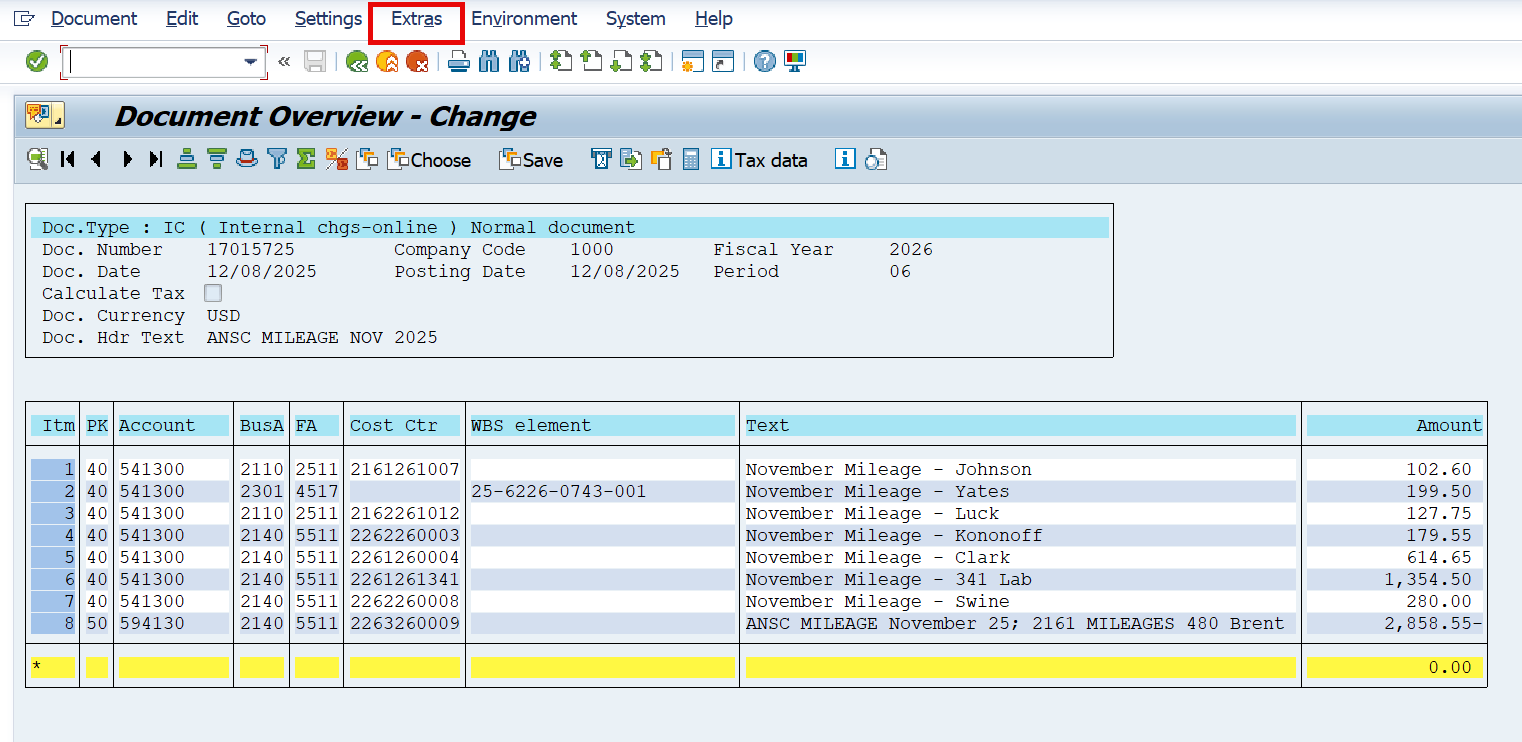
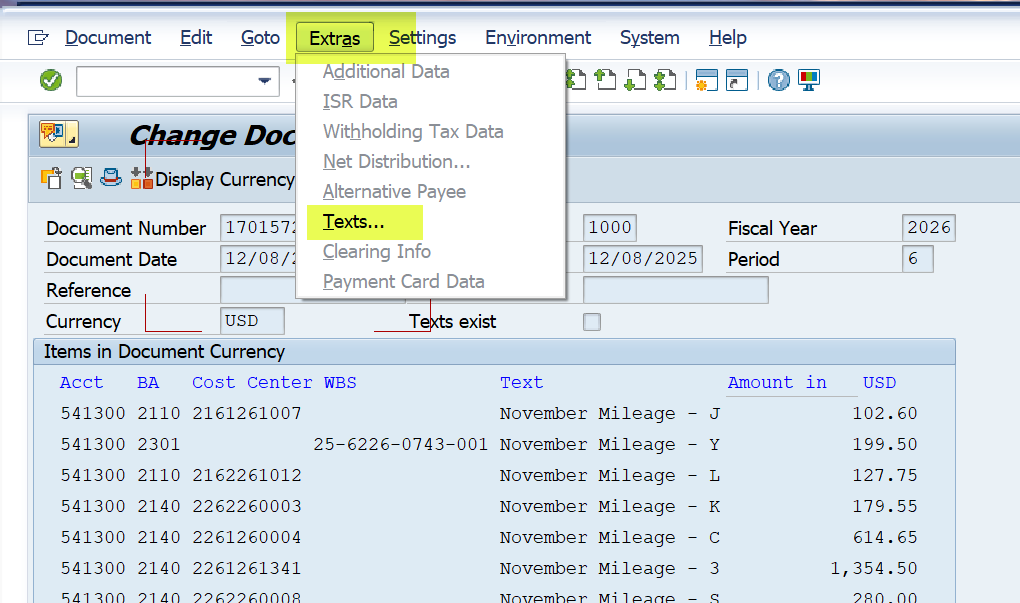
- Click on Extras on the menu bar across the top of the screen, then select Texts from the dropdown menu.

- While it may seem strange to repeat these actions, again select Extras and Texts. A window will open.
- In the window, click on the Correspondence line, which will open an empty page (known as the Extended Document Explanation field in SAP) where you can enter a full explanation for the JE. An explanation is often copied from an email or other supporting document and then pasted into this area.
- To save the entry, click Back to save changes, then click Continue in the Text in Accounting dialog box to close the pop-up.
Attach Documentation
Use transaction code FB03 Document Display to electronically attach documentation.
- Save relevant documentation (e.g., email requesting JE, or other items) as a .pdf file.
- Open transaction code FB03 in SAP and enter the document number to which the attachment applies. This will open the Document Overview - Display window.
- Click on the Services for Object icon in the upper left corner. If you click on the small arrow in the lower right of the icon, select Create an Attachment. If you click on the icon's picture, it will open an Accounting document window that shows 5 icons in a row. Click on the first icon, which is Insert Document as Attachment.
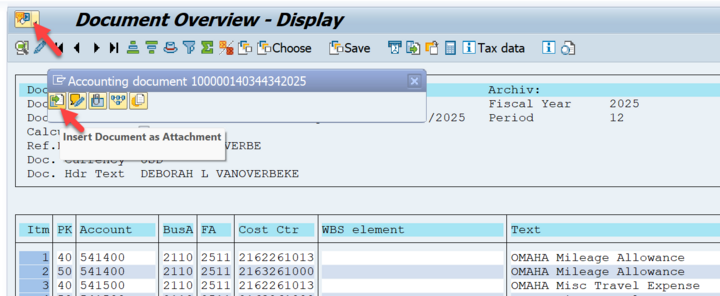
- Proceed with attaching a document. A message indicating the attachment was successfully created will appear in the lower left of the SAP screen.
Check Your Work
After completing a journal entry, there are a couple of reports that will help you check your work.
Note: Even though you are able to post a journal entry to ANY valid cost object on all campuses; you will only be able to run reports for the cost objects for which you have security.
Actual Line Items Report - KSB1 for cost centers
The Actual Line Items Report (Transaction code: KSB1) can be used to monitor actual postings made to a particular cost center (does not include WBS elements); it can also assist users in searching for particular information such as a specific journal entry or invoice. Instructions for accessing and reading this report are available in Sapphire.
Actual Cost Line Items Report - CJ74 for WBS numbers
The Actual Cost Line Items Report (Transaction code: CJ74) can be used to monitor actual postings made to a particular project or WBS element (does not include cost centers numbers); it can also be used to search for particular information such as a specific journal entry or invoice. Instructions for accessing and reading this report are available in Sapphire.
Video Example
In this video, Business Center staff demonstrate how to do a journal entry.
Copy or Reverse a JE
Copying a previously created JE and editing its contents can be an efficient way to create a new JE or correct a previously posted JE. For copying, any G/L account document can be used as a reference and all copied data can be edited before posting. The procedure for copying a posting can also be used to reverse a JE posting, which reverses the debit/credit entry indicator for each line before copying it into a new document. If you have made a mistake in posting a JE, the reversal process will allow you reverse the original JE, make the necessary corrections and repost it as a new document.
In SAP, the transaction name is G/L Account Posting with Reference.
Transaction code: FBR2
Path: Accounting > Financial Accounting > General Ledger > Document Entry > Enter G/L Account Document -- After following the menu path, "Go to" > Post with reference
Reversing a JE
This is the method for departmental users to reverse a posting.
Note: This method will reverse ALL LINE ITEMS and should be used with caution. If it affects another department, make sure to notify them of the reversal.
- After going to the FBR2 screen, complete/review the following fields then click the Enter button (a green circle with a checkmark in it).
- Document Number – In the Reference Box, enter the document number to reverse.
- Company Code – enter 1000
- Fiscal Year – Enter the fiscal year to which the document number was originally posted
- Check these three check boxes:
- Generate reverse posting
- Enter G/L account items
- Display line items
- Optional: Do Not Propose Amount - Select this check box if you want to omit amounts when copying the reference document.
- Optional: Copy Texts - Select this check box if you want the "extra texts" copied from the reference document.
- Click the Enter button to bring up the Post Document: Header Data screen.
- On the Post Document: Header Data screen, make changes to any of the document values and then click the Enter button.
- Values are pulled for the original reference document. Replace them as necessary for the new document.
- Change the document and posting date to the current date. Change period if needed.
- In the Reference field, add the original document number. This provides reference to the original document and provides an audit trail.
- Leave Document field blank.
- If you are reversing the original entry, add "Revr" to doc header description.
- Click Enter and it will take you to the Post Document add G/L account items screen.
- Once all lines have been copied, the message "Last Line Items of Reference Document" message displays.
- If this message does not appear, or more line items need to be added, click the button labeled "Fast Data Entry" to continue adding data.
- NOTE: In the column with heading PK, 40 means Debit and 50 means Credit. If you are reversing the entry, the system will automatically flip the original debits to credits and vice versa.
- Click the Overview icon (mountains).
- Add the justification/explanation for the document in "Extras > Document Text" if needed.
- Post the document
- After reviewing all line items and ensuring the document is balanced, click the Save button to post the document. The document number will display in the status bar or dialog box.
- Record the number of the document created for easy location at a later date.
Internal Charges (ICs and IBs)
An internal charge (IC) is used when one area or department of the University charges another University area or department for goods or services provided. The University department that is charging for their good/service is known as the billing department and they are responsible for posting the transaction that charges the expending department's cost object for goods/services. The billing department enters the internal charge (IC) directly into SAP via FB50 or ZPOST transaction code.
Some internal services are charged using an internal batch charge (IB). The billing department works with UNL’s Accounting office to charge multiple departments at one time through an automated batch process. The batch is managed and posted by Accounting staff. Internal batch charges are often used by service providers like Mail Services or Print Services who bill their services to a large number of internal clients on a regular basis.
Responsibility
Using an IC or IB, the billing department is responsible for posting the transaction that charges the expending department's cost object.
Caution: Special G/Ls for Internal Transactions
Internal charges (ICs and IBs) move funds (payment for goods/services) out of the expending department's cost object and into the billing department's cost object. These transactions move funds inside the University and do not increase or decrease total University revenue or expenses. To prevent these internal transactions from incorrectly impacting the University's overall financial statements, ICs and IBs are recorded using specific G/L accounts. Transactions using these specific G/Ls can then be excluded from the overall University financial statements.
When posting an IC or IB, there will always be at least two entries per transaction and those entries will net to zero. Both the debit and credit transaction lines will be identified as an IC (or IB if processed in batch).
- On the debit side of the transaction, funds are pulled from the expending department's cost object to pay for good/services they received from the billing department. The transaction represents an expense for the expending department, so the transaction is entered into SAP using an appropriate expense G/L.
- On the credit side of the transaction, the billing department's cost object receives payment for the goods/service they provided to another area of the University. Normally, one would expect the credit G/L to be selected from the G/L Account Revenues List. However, because the transaction is internal, the G/L must be carefully selected so that the transaction can be identified and eliminated from University revenues.
Auxiliary Billing Department (23 cost center)
As described in Cost Object Smart Numbering, auxiliary funds are earned by non-academic self-supporting University entities whose reason for existing is to provide their specific service to faculty, staff and students in a personal capacity. Examples of auxiliary billing departments charging for their goods/services are Housing Services charging housing fees and Parking Services charging parking fees.
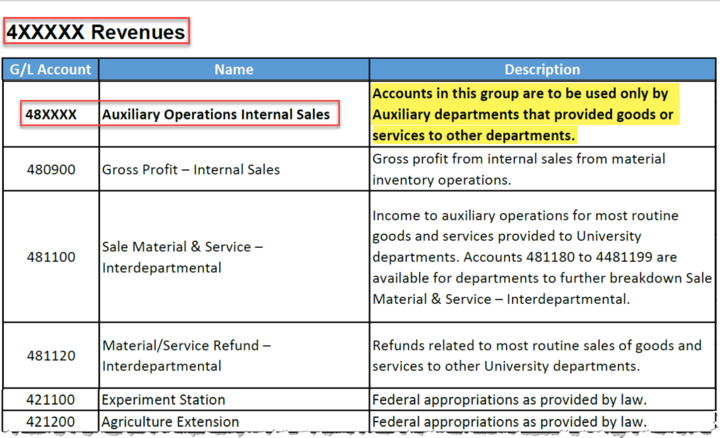
When a billing department provides goods/services to an another internal department and is receiving payment (revenue) into a cost center that starts with 23 (which indicates UNL auxiliary fund), the billing department must select an appropriate GL from the 48xxxx GL series to code the credit. The 48xxxx series GLs are reserved for "Auxiliary Operations Internal Sales." The expense is charged to the expending department's cost object using a 5xxxxx GL, indicating an expense.
Revolving Billing Department (22 cost center)
As described in Cost Object Smart Numbering, revolving funds are typically earned by an academic department whose primary mission is academic, but which incidentally earns revenue. Examples of revolving funds include funds earned by providing a good or service to the campus or to external entities, registration fees charged by a department hosting a conference, funds received from student lab fees, or the incidental remainder of grant funds after completion of the grant-funded project. In each instance, the revenue is posted to the billing department's revolving cost center, which starts with a 22.
When a billing department provides goods/services to an another internal department and is receiving payment (revenue) into a cost center that starts with 22 (indicating a UNL revolving fund), the billing department must select an appropriate GL from the 59xxxx GL series to code the credit. The 59xxxx series GLs appear on the GL Account Expenditure List and are identified as "Expenditure Credits."
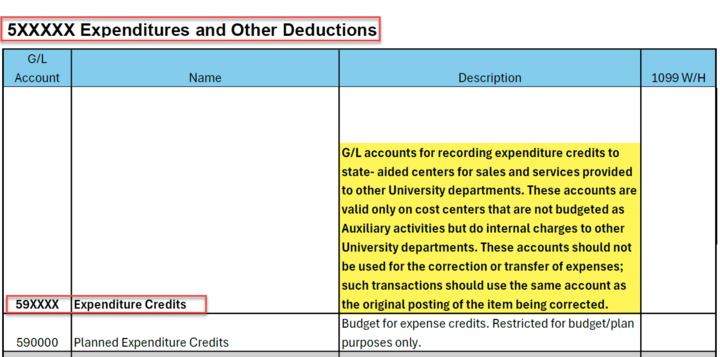
The table below shows how to properly assign G/Ls to internal transactions in which the billing department is receiving the funds into a revolving cost center (22). In these transactions, in order for the transaction to be excluded properly from the University's revenue/expense financial statements, the billing department and the expending department's G/Ls must be selected from corresponding G/L ranges. The table below shows the corresponding G/L ranges for specific types of expenses.
UNL Expense Credit Reference Table | ||
Expense Category | Expending Department G/L Account Range | Billing Department G/L Account Range |
Supplies & Materials | 520000-521199 | 592100-592119 |
521300-524999 | 592130-592499 and 592692-592899 | |
530000-459999 | 593000-593369 and 593371-595269 | |
554100-554999 | 599211-599954 and 595100 | |
582100 | 599214 | |
Communications | 512200-521299 | 592120 |
Repair and Maintenance | 525000-525999 550000-554099 555000-559999 |
592500-592599 and 595270
|
Contractual Services | 526000-528999 | 592600-592693 and 593370 |
Utilities | 529000-529999 | 592900-592999 |
Scholarships & Fellowships | 560000-56999 | 596250-596600 |
Revolving billing department's process for refunding internal charge
If a revolving billing department (22 cost center) needs to process a refund for a good/service that they previously charged to an internal expending department, they (the billing department) should use the same 59xxxx G/L and 22 cost center on the billing side of the entry to record revenue.
Auditing Response
The Accounting functional office performs a post-audit review and will contact departments that have incorrectly used G/Ls for internal transactions. If a department has incorrectly used a 59xxxx G/L to post a transaction to a 23 cost center or used a 48xxxx G/L to post to a 22 cost center, the department will need to correct the posting error.
Payroll Journal Entries (PJs)
Allocations vs. Retro Funding Changes
Payroll journal entries (PJs) move payroll charges from one cost object to another. PJs are used by Payroll Services and by Accounting in two distinct processes.
- Payroll transfers that change salary and benefits are rare and are only entered by Payroll as part of the retro funding change process.
- There are only two types of PJs that are handled outside of the retro funding change process and both are related to allocations of grad tuition/grad health and worker's comp/unemployment, which are processed by Accounting.
Graduate tuition and graduate health allocations
If a graduate student's payroll funding changed within the semester, the department should use the ZPOST process (using the PJ doc type) to submit a preformatted Excel spreadsheet to Accounting to move all or part of the grad tuition/health allocations to match the payroll funding change. After completing the Excel spreadsheet, email the Excel file and supporting documentation to Accounting at accounting@unl.edu for entry into SAP.
Note: Personnel number and position number must be provided when changing grad health/tuition. These numbers are necessary for reconciling the payroll system with the financial system postings by personnel number.
Read more about grad allocations.
Worker's Comp and Unemployment on locked cost objects
Each quarter, the WC/Unemp allocation process calculates a year-to-date amount per active cost object for the current rate and then subtracts any allocations already posted for the fiscal year. This process automatically corrects for instances where payroll has moved or the rate has changed since the previous quarter. PJs should only be posted to move allocations if a cost object will be closed or locked before the next quarter’s allocation is posted. The department should use the ZPOST process to move all or part of the WC/Unemp allocations to a different funding source. Following the ZPOST instructions, complete the Excel file (using the PJ doc type), then email the Excel file and supporting documentation to Accounting at accounting@unl.edu for entry into SAP.
Accounting's role in allocation process
Accounting staff process PJs on a weekly basis. When processing is completed, Accounting staff "Reply All" to the requestor's email and provide the SAP document number, so that all are notified that the PJ has been completed.
If Accounting receives a G/L Account Posting form to move salaries/wages or regular benefits (i.e., GLs 511000-519302 and 519400-519520), Accounting notifies the department that they are not using the correct form and procedure. The correct form and procedure is provided in the Retro Funding Change process.